Blueprint Format
Blueprints are stored in a similar format to the player’s inventory or pieces of procedurally generated buildings, a set of {key}:{value} pairs.
This string of {key}:{value} is zlib compressed (level 9), given a 8-byte prefix with total length, then base-64 encoded. This base-64 string is given a short prefix.
This will be the example blueprint.
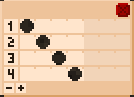
 It is a chest holding a punchcard with this pattern
This is its string
r2dbp0bJAIAAAAAAAB42m1R7W7DIAx8oUoLXbWs+9d1fYqpQg54CRohEZCtEeLdZ4emWqfxhzt/cGeTWm90fkkpGotSzw56o6SGCBR8T6oD36KWHXqkQJXXSCGjHxpo7CwVOHmJftJcJXJasHFtKfsAhfIbrZYmSOMiege2pP6TTes9Tk51GNhJtR5xvmFR3bCobphgdV58OoeWm3eZnA7BRDM4Vt2sunEe2e8io8Brqgt2iBLJPsgQQX1KNUwuFq9L7n4yDhHaPotdvdvXT/t6uxePd3LirxyPFDNZ7OFSRMrOtOnRBWriHQX0kTbL9duNKA/wLKmZI54IPLSHQ17Y2x07FnYq7JWZOV5zB2ad/cq/xa4KOdEfsBxeoB/JbWMnHD39Vv4BUrbR4Q==
The prefix is r2dbp0b. You can probably see the size has a lot of zeros: JAIAAAAAAAB.
After base64 decoding and using the first 8 bits as the size to zlib decompresse with level Z_BEST_COMPRESSION, this is the string.
{grid}:{{tile_dynamic_data}:{[{charged_here}:{0}{charged}:{0}{probably_can_xtrude}:{1}{xtruding}:{0}{face_weld_is_internal}:{0}{tile_dynamic_data}:{{data}:{{punches}:{[0000000001][0000000010][0000000100][0000001000]}{channels}:{4}}{position}:{0,0}{tile_type}:{punchcard}}{slot_extra_stack_count}:{0}{slot_xtruding}:{0}{slot}:{281474976972913}{position}:{1,0}{tile_type}:{chest}]}{max_stack}:{1}{dimensions_insertable}:{2,1}{tiles}:{{byteE}:{/gAA}{byteD}:{/gAA}{byteC}:{/gAE}{byteB}:{/iCA}{byteA}:{/hlv}}{dimensions}:{2,1}}{name}:{example_blueprint}
SMP format
This is the smp format roody:2d uses for all the human-readable data.
The order of {key2}:{value2} {key1}:{value1} pairs does not matter, but arrays seperated with [element 1][element 2][element 3] do often have significant order.
Here, Whitespace can be added for clarity, and the order of some values have been changed.
{name}:{example_blueprint}
{grid}:{
    {dimensions}:{2,1}
    {dimensions_insertable}:{2,1}
    {max_stack}:{1}
    {tiles}:{
        {byteA}:{/hlv}
        {byteB}:{/iCA}
        {byteC}:{/gAE}
        {byteD}:{/gAA}
        {byteE}:{/gAA}
    }
    {tile_dynamic_data}:{
        [
            {tile_type}:{chest}
            {position}:{1,0}

            {charged_here}:{0}
            {charged}:{0}
            {probably_can_xtrude}:{1}
            {xtruding}:{0}
            {face_weld_is_internal}:{0}
            {slot_extra_stack_count}:{0}
            {slot_xtruding}:{0}

            {slot}:{281474976972913}
            {tile_dynamic_data}:{
                {tile_type}:{punchcard}
                {position}:{0,0}
                {data}:{
                    {punches}:{
                        [0000000001]
                        [0000000010]
                        [0000000100]
                        [0000001000]
                    }
                    {channels}:{4}
                }
            }
        ]
    }
}
Note that in the blueprint.smp files that save multiple blueprints, the name is there twice. One outside, {name}:{blueprint string}, and one inside the compressed blueprint string itself.
Blueprint names with mismatched {} are invalid.
Inside the grid value of the blueprint smp, there are 3 important values. dimensions, tiles, and tile_dynamic_data.
The value for max_stack is always 1, and dimensions_insertable is always the same as dimensions. These values are here because the format for grid is the same as the player inventory, and that can have different values.
tiles
While Roody:2d is running, it uses an “array of structs” format for tiles.
struct Tile {
    uint8_t byteA; // tile type, like stone, copper_bar, actuator_head, or air (0)
    uint8_t byteB; // welding and movement
    uint8_t byteC; // tile-type defined
    uint8_t byteD; // tile-type defined
    uint16_t;
    uint8_t byteE; // either stack-count, OR 7 bits of light level and a 1 bit flag for actively being extracted/heated
    uint8_t;
    //the other uint16_t and uint8_t are for various gameplay algorithms, but since these always get reset to 0 at the end of the algorithm, they aren't saved.
};
(Blueprint tiles always have a stack-count of 1 (or 0 for air), and don’t interact with light, so byteE is irrelevant.)
This is a typical way an array of tiles is turned into a 2d grid
struct tileV2D {    // tile-scale "vector 2 dimensional"
    int32_t x;      // one unit of tileV2d is 16 pixels
    int32_t y;      // tileV2D is the most commonly used scale. It is the gameplay grid of Roody:2d
};
struct Grid {
    tileV2D dimensions;
    std::vector<Tile> tiles;
    Tile & access(tileV2D index) {
        return tiles[dimensions.x * index.y + index.x];
    }
}
The blueprint grid has tile data in this format, a “struct of arrays”.
{tiles}:{
    {byteA}:{/hlv}
    {byteB}:{/iCA}
    {byteC}:{/gAE}
    {byteD}:{/gAA}
    {byteE}:{/gAA}
}
To turn this “struct of arrays” into an “array of structs”, each byte-layer, like /hlv or /iCA, is ran through a RLE compression.
I have open sourced this specific RLE compression.
Most blocks in Roody:2d work fine with just 2 bytes of tile-specific data, byteC and byteD.
For example: glasses, mirror, and air uses 12 bits to store the 3 beam channels moving in 4 different directions, and a 13th bit as a cache for if any of the 4 directions are the end of a beam. Mirror uses another bit for its orientation, and air uses a few bits to stop multiple blocks from sliding into the same air block simultaneously.
tile dynamic data
Some blocks, like chests, punchcards, or command blocks, need more than 16 bits. These blocks have data stored separately, and use 13 bits of byteC and byteD as a cached index to quickly find this separate data (1 more bit as a bool for having any data). This separate data always has a position to find the tile.
The blueprint grid has tile dynamic data in this format. It is a [] delimited array. In this example, there is only one entry, the chest.
[
    {tile_type}:{chest}
    {position}:{1,0}

    {charged_here}:{0}
    {charged}:{0}
    {probably_can_xtrude}:{1}
    {xtruding}:{0}
    {face_weld_is_internal}:{0}
    {slot_extra_stack_count}:{0}
    {slot_xtruding}:{0}

    {slot}:{281474976972913}
    {tile_dynamic_data}:{
        {tile_type}:{punchcard}
        {position}:{0,0}
        {data}:{
            {punches}:{
                [0000000001]
                [0000000010]
                [0000000100]
                [0000001000]
            }
            {channels}:{4}
        }
    }
]
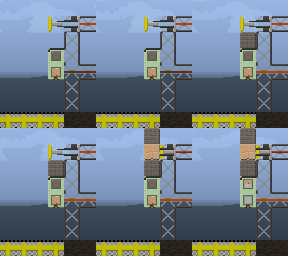
Each chest actually has 2 slots.
One is the normal slot the player can interact with, and the other is the xtruding_slot.
This other slot is only used when a chest is actively pushing out a block. For multi-chests, the xtruding-slot can even be a different type, like the top chest in this gif. Notice how the chest simultaneously holds a gray and tan block.
The slot or slot_xtruding is stored as uint64_t bit-cast of the single 8 byte tile. Stack count is in byteE.
If the tile in slot or slot_xtruding is a punchcard or command block, that will also need tile dynamic data. This is stored in tile_dynamic_data for the main slot, or tile_dynamic_data_xtruding.
In this example, the chest is at position 1, 0, and slot is 281474976972913.
Since the chest is not extruding in the example blueprint, slot_xtruding is 0, and the empty {tile_dynamic_data_xtruding}:{} is omitted from the chest smp data.
281474976972913 is 1000000000000000000000000000001000000000001110001 in binary. Separated into little-endian bytes, that is
byteA:01110001 //113, the block ID for punchcard
byteB:00000000 //the punchcard is not welded, and since it is inside a chest, it can't move
byteC:00000100 //single bit that signifies it has a tile_dynamic_data somewhere
byteD:00000000 //the cached index to find that tile_dynamic_data is 0
00000000 00000000 //not saved
byteE:00000001 //stack size of 1
00000000 //not saved
The punchcard inside the chest (inside the blueprint) has tile dynamic data
{tile_type}:{punchcard}
{position}:{0,0}
{data}:{
    {punches}:{
        [0000000001]
        [0000000010]
        [0000000100]
        [0000001000]
    }
    {channels}:{4}
}
The position of a tile dynamic data inside a chest is always 0, 0. The bits in a punchcard are stored in binary, making them easy to compare with the in-game editor. A punchcard will either be pushed from a reader or loop at the last set bit (not the length of the punches data).
To see how chunks store tiles in .rsv files, see .rsv format.